Showing posts with label IIS. Show all posts

Thursday, July 14, 2011

On Demand training on latest web technologies

image


Programming with HTML5 and related technologies

http://www.microsoft.com/showcase/en/in/details/4f39070b-c435-4de5-9f50-0d2852c1dfbe

Visual Studio 2010 SP1 for Web Developers

http://www.microsoft.com/showcase/en/in/details/90b79e80-eae9-47c8-a4f4-a2431e62178d

ASP.NET MVC3 Development with Visual Studio 2010

http://www.microsoft.com/showcase/en/in/details/fd907f28-bcbd-4a00-871f-4be5965d3764

Code-First Development with Entity Framework

http://www.microsoft.com/showcase/en/in/details/966167f3-9da3-422b-ab7c-0ecedd3ae5f2

Web Sockets & Indexed DB

http://www.microsoft.com/showcase/en/in/details/83478b2d-e2c2-427d-8a05-7e795efa03f0

Building cross browser compatible websites

http://www.microsoft.com/showcase/en/in/details/0ed592c6-cf3b-495b-8e22-48f530f89f3b

Thursday, March 19, 2009

* Enabling classic ASP on IIS 7.0 Vista

Classic ASP by default is not installed on IIS 7.0. When you try accessing an asp page hosted on IIS 7.0, the following error will come:

HTTP Error 404.3 - Not Found

The page you are requesting cannot be served because of the extension configuration. If the page is a script, add a handler. If the file should be downloaded, add a MIME map.

To enable/install classic ASP runtime do the following :

Control Panel –> Programs and features –> Turn Windows features on or off –>

image

Check the box for ASP. Done.

Friday, October 03, 2008

* What’s new in ‘Dublin’ – The Windows Application Server

With the introduction of .NET to Windows Application Development, the need for end to end Application Server functionality starting coming out.

Before .NET, COM/COM+ hosting services provided much of the app server functionality for business components and IIS was there for website provisioning.

But COM/COM+ was not opened for hosting managed components and instead IIS was promoted to start acting as App Server also with Windows 2003.

In Windows 2008 it improved further with the introduction of Windows Activation Service (WAS) which together with IIS provided end to end support.

The new Application server codenamed ‘Dublin’ is trying to simplify it further by making deployment, management and scaling the applications easier.

Check out my quick article on the information which has been made public.

What’s new in ‘Dublin’. I will be updating this article as and when information becomes available.

Thursday, October 25, 2007

* Troubleshooting : Client Certificate Authentication

You are doing a setup for Client Certificate Authentication for your web application. The client and server tools involved are :

  • Internet Explorer 6 or 7
  • IIS 6.0
  • Windows 2003

After installing client and server certificates and enabling 'Accept Certificates' at IIS end, you may face one of these problems:

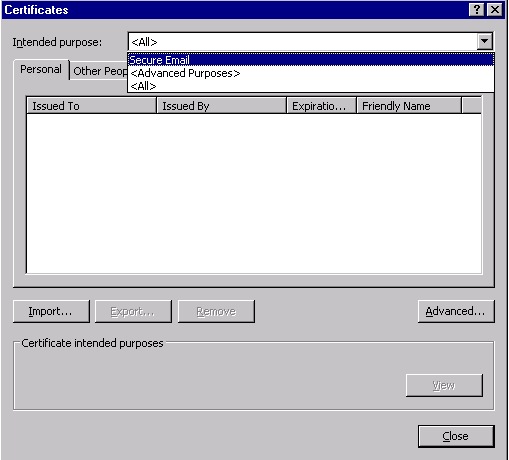
  • You are not able to verify whether the client certificate is currently installed for 'Client Authentication' in my browser because 'Intended purpose' doesn't show 'Client Authentication'

image

  • When I try to access the site which accepts client certificates, I get a popup in browser to select the client certificate but it does not list my browser certificate.

Here are some things you can check:

  • To get the 'Client Authentication' in 'Intended Purpose' drop down. Click 'Advanced..' button and uncheck 'Client Authentication'.
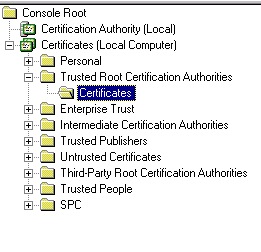
  • Make sure that the CA of the client certificate is added to 'Trusted Root Certification Authorities' directory of web server machine. You can access this directory using 'Certificates' mmc snap-in.
  • image
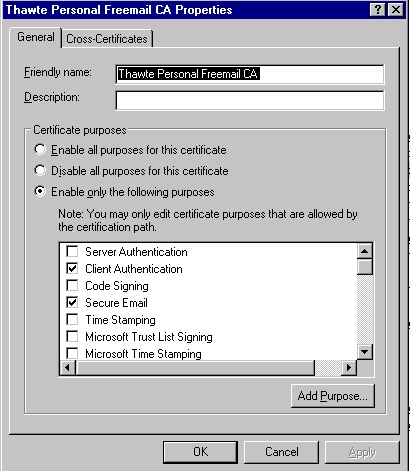
  • Make sure the properties of the CA in same directory shows 'Client Authentication' as checked for Certificate Purposes.
  • image

Friday, August 03, 2007

* WCF : Hosting WCF service in IIS

Previous Post <- WCF Tool : WCF IIS Registration Tool (ServiceModelReg.exe)

  • Pls start from the project created in following post : Developing a basic WCF client and service
  • Add a class which will be used to store two numbers.
        [DataContract]
    public class Numbers
    {
    private int firstNumber;
    private int secondNumber;
    [DataMember]
    public int FirstNumber
    {
    set
    {
    firstNumber = value;
    }
    get
    {
    return firstNumber;
    }
    }
    [DataMember]
    public int SecondNumber
    {
    set
    {
    secondNumber = value;
    }
    get
    {
    return secondNumber;
    }
    }
    }

  • Add another method to the contract which takes instance of Numbers and return the total of the two numbers stored in object.
            [OperationContract]
    int AddNum(Numbers numbers);

  • Create a Virtual Directory in IIS say with name as MathService.
  • Create a text file in this vd with name as MathService.svc
    <% @ServiceHost Service="MathUtility.MathService" %>

  • Create a bin folder in this directory. Add Service library to this folder.
  • Add web.config to vd where we will add our wcf service config details.
    <configuration>
    <!-- This Section is exclusive for WCF configuration for both service and client -->
    <system.serviceModel>
    <!-- This section is to declare services hosted using this cofig file -->
    <services>
    <!-- This section declares individual service. name=type name which implements service contract -->
    <!-- behaviorConfiguration = name of bahavior config which we will define later -->
    <service name="MathUtility.MathService" behaviorConfiguration="MathServiceBehavior">
    <!-- the actual address where service is exposed -->
    <endpoint address="" binding="wsHttpBinding" contract="MathUtility.IMath"></endpoint>
    <!-- The address where metadata is exposed and will be used by Svcutil.exe to generate client classes -->
    <endpoint address="mex" binding="mexHttpBinding" contract="IMetadataExchange"></endpoint>
    </service>
    </services>
    <behaviors>
    <serviceBehaviors>
    <!-- The behavior which we mentioned above in <service> section-->
    <behavior name="MathServiceBehavior">
    <!-- Exposing metadata on http. Not mandatory for fuctioning of service if client already has metadata-->
    <serviceMetadata httpGetEnabled="True"/>
    </behavior>
    </serviceBehaviors>
    </behaviors>
    </system.serviceModel>
    </configuration>

  • Note there is no <host> tag as we mentioned in self-hosted service because IIS with the virtual directory defines the base address of the service.
  • In this case our service will be hosted at following url : http://<My_Machine>/mathservice/mathservice.svc
  • Access the above url and you will see a default page generated with information on service.
  • You can use svcutil to generate the client code as explained in earlier post to build client and test your service.
  • The address which can be provided to svcutil can be one of following :

    • http://<My_Machine>/mathservice/mathservice.svc?wsdl


    • http://<My_Machine>/mathservice/mathservice.svc


    • http://<My_Machine>/mathservice/mathservice.svc/mex

  • My console app code which uses generated  client.
    using System;
    using System.Collections.Generic;
    using System.Text;
    using MathUtility;

    namespace ClientToIIS
    {
    class Program
    {
    static void Main(string[] args)
    {
    MathClient mathClient = new MathClient();
    Numbers number = new Numbers();
    number.FirstNumber = 1;
    number.SecondNumber = 2;
    Console.WriteLine(mathClient.AddNum(number));
    }
    }
    }

  • For simplicity you can trim the generated client side app.config to only following mandatory elements.
    <?xml version="1.0" encoding="utf-8"?>
    <configuration>
    <system.serviceModel>
    <client>
    <endpoint address="http://<My_Machine>/MathService/MathService.svc"
    binding="wsHttpBinding"
    contract="IMath" >
    </endpoint>
    </client>
    </system.serviceModel>
    </configuration>

Next Post ->> WCF : Diagnostics Features


* WCF Tool : WCF IIS Registration Tool (ServiceModelReg.exe)

Previous Post <<- WCF : Overview of Hosting in IIS

This tool is used to manage the registration of ServiceModel with IIS. ServiceModel is required for hosting WCF services in IIS.

Although if IIS is already present machine where .NET 3.0 is installed, the ServiceModel gets registered automatically but it case of issues this tool can be used for following :

  • Registration
  • Re-Registration
  • UnRegister
  • List all the components registered
  • Verification of registered components.

This tool can be found at following location : %windir%\Microsoft.NET\Framework\v3.0\Windows Communication Foundation

If you have installed pre-release versions of WCF, you will have to do some manual changes in  machine.config. Pls chk MSDN for same.

Next Post -> WCF : Hosting WCF service in IIS

* WCF : Overview of Hosting in IIS

Previous Post <<-- WCF Tool : ServiceModel Metadata Utility Tool (Svcutil.exe)

  • WCF services hosted in IIS get all the benefits of IIS environment like scalability, recycling, etc.
  • Can be hosted on IIS 5.1, 6.0 and 7.0
  • 5.1 is recommended only for development while 6.0 and 7.0 can be used for production.
  • 6.0 supports only http but as IIS 7.0 uses Windows Activation Service (WAS) for protocol activation and communication, protocols other than http are also supported.
  • Before WCF services can be hosted in IIS, a WC HTTP activation component (ServiceModel) needs to be installed and registered in IIS.
  • You can verify the installation of this component using tool called ServiceModel Registration Tool.
  • WCF services can be hosted in same AppDomain as ASP.NET application in two modes : 1) Side-by-Side 2) ASP.NET Compatibility Mode
  • In 'Side-by-Side' ASP.NET and WCF share the AppDomain state & so static variables etc. But ASP.NET HTTP Runtime process only ASP.NET requests and doesn't participate in processing of WCF requests. HttpContext, HttpModules and ASP.NET Impersonation features are not available to WCF services. WCF Services can communicate on protocols other than HTTP on IIS 7.0.
  • In 'ASP.NET Compatibility Mode', WCF requests participate in HTTP request pipeline and thus can't communicate over other protocols other than HTTP.
  • WCF Services code can be deployed on IIS either in App_Code folder as source files or as compiled assembly in bin folder of Virtual Directory.

Next Post -> WCF Tool : WCF IIS Registration Tool (ServiceModelReg.exe)

Monday, March 26, 2007

* Reverse Proxy for IIS

While a proxy or 'forward proxy' is used to control access to Internet by internal corporate users, the ' reverse proxy' is used to control the access of internal assets from Internet users.

A popular example of reverse proxy is 'ISA - Internet Security & Acceleration Server'. 

ISA is actually much more than a reverse proxy server and is a commercial product.

I have started a new Open source project on Codeplex for Reverse Proxy.

This project aims at building an open source reverse proxy using .NET technologies for IIS 6.0 web server.

The main features which this component aims to provide are :

  • URL re-writing
  • URL mapping
  • Support GET & POST requests
  • Support URL redirects
  • Support ASP.NET sessions
  • Authentication
  • Authorization
  • SSL enabled at both ends

It can be accessed here.

Pls provide your views/feedback to dotnetwithme@hotmail.com

~tata & take care~

Other Posts

Friday, December 15, 2006

* IISRESET : RPC server not available

If you are getting 'RPC server is not available'  while doing iisreset from command prompt ..make sure that apart from RPC service being running, ' DCOM Server Process Launcher ' is also running.

This service even breaks your computer's WMI configuration.