Showing posts with label Internet Explorer. Show all posts

Thursday, July 14, 2011

On Demand training on latest web technologies

image


Programming with HTML5 and related technologies

http://www.microsoft.com/showcase/en/in/details/4f39070b-c435-4de5-9f50-0d2852c1dfbe

Visual Studio 2010 SP1 for Web Developers

http://www.microsoft.com/showcase/en/in/details/90b79e80-eae9-47c8-a4f4-a2431e62178d

ASP.NET MVC3 Development with Visual Studio 2010

http://www.microsoft.com/showcase/en/in/details/fd907f28-bcbd-4a00-871f-4be5965d3764

Code-First Development with Entity Framework

http://www.microsoft.com/showcase/en/in/details/966167f3-9da3-422b-ab7c-0ecedd3ae5f2

Web Sockets & Indexed DB

http://www.microsoft.com/showcase/en/in/details/83478b2d-e2c2-427d-8a05-7e795efa03f0

Building cross browser compatible websites

http://www.microsoft.com/showcase/en/in/details/0ed592c6-cf3b-495b-8e22-48f530f89f3b

Thursday, May 20, 2010

* SharePoint : Add custom search provider to IE for SharePoint site

Both IE8 and SharePoint/MOSS 2007 are OpenSearch compliant. This enables SharePoint admins to publish a custom search provider for IE users so that users can search the site content from browser search bar.

Here are the steps:

  • Start with identifying the search URL for your site. A typical search url looks like following :

    http://<portal>/_layouts/srchrss.aspx?k={searchTerms} . This returns results in RSS format.

  • Create a search provider xml file. <name>.xml

<?xml version="1.0" encoding="UTF-8"?>
<OpenSearchDescription xmlns="http://a9.com/-/spec/opensearch/1.1/" xmlns:ms-ose="http://schemas.microsoft.com/opensearchext/2009/">
    <ShortName>My Portal</ShortName>
    <Description>Realtime My Portal Search</Description>
    <Url type="application/rss+xml" template="http://<portal>/_layouts/srchrss.aspx?k={searchTerms}"/>
</OpenSearchDescription>

  • Upload the above file to anywhere in document library of your portal.
  • Add a following link on home page of you portal. You can use ‘Content Editor Web Part’.

    <link title="My Portal Search" type="application/opensearchdescription+xml" rel="search" href="<path to file uploaded>" />

  • When you will load the home page in IE, it will show additional search provider as shown below which you can add permanently.

image

Tuesday, July 21, 2009

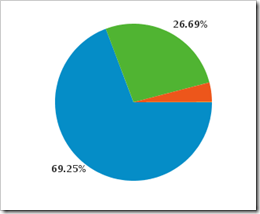
* IE 8 adoption increasing

Below are the stats of my Blog over last 4 months.

IE Legend:

image

March

image 

April

image 

May

image 

June

image